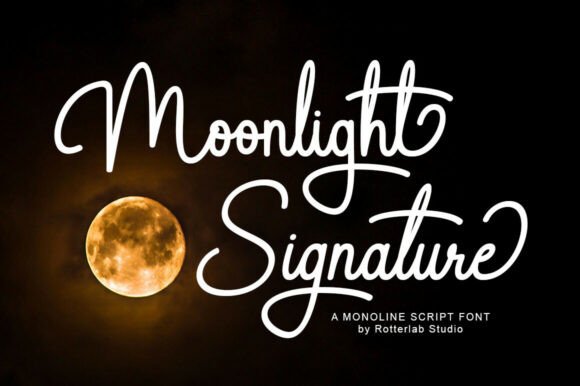
Moonlight Signature: Elegance Meets Precision in Script
A Typeface with a Natural, Polished Flow
Moonlight Signature is a sophisticated monoline script font designed by Rotterlab Studio. It captures the fluid motion of a hand-lettered signature while maintaining the technical clarity needed for digital and print design. The font’s defining feature is its consistent line weight—each stroke flows with uniform thickness, creating a clean, balanced aesthetic. This monoline consistency gives the typeface a modern, minimalist feel, avoiding the visual noise that can sometimes come with traditional script fonts.
The letterforms in Moonlight Signature are connected and graceful, with sweeping ascenders and expressive descenders that mimic authentic cursive handwriting. It supports both uppercase and lowercase characters, offering flexibility for creating hierarchy and emphasis in your designs. Whether you're crafting a personal brand or designing for a client, this font brings a personalized touch without looking overly casual or unstructured.
Where Moonlight Signature Truly Shines
This script font excels in projects where you want to convey elegance, approachability, and a handcrafted quality. It’s a versatile design asset that works across multiple mediums:
- Branding & Logo Design: Moonlight Signature is ideal for creating distinctive logos, especially for boutique brands, lifestyle products, or creative professionals. Its clean lines ensure legibility at smaller sizes, making it suitable for business cards, packaging, and website headers.
- Editorial & Publishing: Use it for magazine headlines, book covers, or blog graphics where a personal, handwritten feel adds warmth and authenticity. Pair it with a simple sans serif font for body text to maintain readability.
- Digital & Social Media: The font’s smooth curves render beautifully on screens, making it perfect for Instagram quotes, Pinterest graphics, YouTube thumbnails, or email newsletters. It helps content stand out with a polished, cohesive look.
- Packaging & Product Design: From cosmetics to artisanal foods, Moonlight Signature can elevate product labels and packaging with its sophisticated script style. It suggests quality and attention to detail.
- Personal Projects: Beyond commercial use, it’s great for wedding invitations, greeting cards, or custom stationery. The font adds a touch of elegance to personal correspondence and DIY projects.
Practical Considerations for Using This Font
When integrating Moonlight Signature into your workflow, keep a few practical points in mind:
- Readability & Hierarchy: While the font is legible for short texts like titles or logos, avoid using it for long paragraphs. Pair it with a neutral serif or sans serif font for body copy to create a balanced visual hierarchy.
- Font Pairing: Test Moonlight Signature with complementary typefaces. It often pairs well with clean sans serif fonts like Montserrat or Lato, or classic serif fonts like Playfair Display. The contrast helps the script stand out while maintaining overall cohesion.
- Project Fit: Consider the personality of your project. Moonlight Signature conveys elegance and modernity, so it may not suit formal or highly technical contexts. It’s best for brands or materials that value creativity, warmth, and personal connection.
- Licensing & Usage: As a premium font, ensure you have the appropriate commercial license for your project—whether for personal use, client work, or merchandise. Review the included styles and glyphs; many script fonts offer swashes or alternates that can add unique flair.
- Testing & Refinement: Always test the font in your design software before finalizing. Check how it looks at different sizes and on various backgrounds. Adjust letter spacing if needed to improve flow and readability.
Moonlight Signature isn’t just a typeface—it’s a design tool that can shape how your audience perceives your brand. Its blend of handwritten authenticity and technical precision makes it a valuable addition to any designer’s toolkit, whether you’re building a brand identity from scratch or refreshing existing materials. By understanding its strengths and limitations, you can use it to create visuals that feel both personal and professional.